Ammon News - Data storage prices have soared throughout 2026, reaching several times higher than they were just a year ago. A single terabyte of solid-state drive (SSD) storage can cost anywhere from $120 to over $200, and even a much slower hard disk drive (HDD) costs upwards of $70. If you're buying an external drive, then you want it to last so you can get the most possible lifetime value from your purchase. Unfortunately, there are numerous common occurrences and daily habits that kill your external drives before their time.
The lifespan of a hard disk drive is dictated by factors like physical wear and damage, while solid-state drives have a finite number of write cycles they can go through. If you're frequently unplugging the drives while data is being transferred or subjecting them to temperature extremes, it can shorten their lifespan significantly. With an HDD, dropping the drive, moving it rapidly, or exposing it to external vibrations during data transfer can also permanently damage it.
SSDs are much more durable. However, there are still things that can kill an SSD before its time. Not managing data properly and power surges can cause an SSD's internals to degrade faster than they otherwise would, and leaving them unpowered for long periods of time can lead to data loss. HDDs are generally considered better for long-term storage, but whether you have an HDD or an SSD, keep these things in mind to extend their lifespan.
1. Improper management of data in SSDs
To ensure your SSD lasts as long as possible, it's important to understand how data is handled in the drive. Unlike an HDD, an SSD has a finite number of write cycles, which means it has a maximum capacity of data it can write before it starts degrading. This is typically given in terabytes written (TBW). If your SSD has an endurance rating of 80 TBW, you can write a total of approximately 80,000 GB worth of data before running into issues. When writing just a few gigabytes (GB) of data each day, this can easily last more than a decade, and it's likely you'll run into other issues before hitting the limit. However, if you're transferring 80 GB every single day, your drive can run out of cycles in just under three years.
Another reason your SSD can die sooner than expected is if you constantly keep it near full capacity. An SSD consists of trillions of tiny cells that each hold some amount of data. If data were to be allocated randomly, it'd mean certain cells go through more cycles than others, resulting in them failing more quickly. To combat this, modern SSDs use a feature called wear leveling. This distributes any new data evenly among all available cells. However, for wear leveling to function properly, you need a certain amount of empty space on your drive. If you have 50% of your total capacity free, then any written data is divided equally among that many cells. However, if you only have 5% of your total storage remaining, there are a lot fewer cells among which to divide the wear. Therefore, it's important to keep some amount of storage free to extend the lifespan of your SSD.
2. Physical impact and mechanical damage in HDDs
There are two main reasons SSDs are favored over HDDs. The first is speed, as an HDD has a mechanical read/write head that physically moves to store or retrieve data, whereas an SSD handles those operations electronically. The other reason is durability, as HDDs are incredibly prone to physical damage due to their structure and composition.
In an HDD, the read/write head presents a point of failure, as its ability to move means the joint is weaker than other parts that are permanently fastened together. Whether you drop your HDD or move it quickly while there is data being written, there's a decent chance that doing so can damage the fragile moving head, rendering the entire drive unusable.
Furthermore, even subtle external vibrations from nearby devices can also interfere with or damage an HDD. To combat this, HDD manufacturers produce more durable drives, such as specific enterprise-grade ones. These fasten the motor to both sides of the chassis, whereas typical HDDs only attach it to one. While this doesn't make the drives immune to physical shock, it mitigates vibrations to an extent.
3. Power outages and surges
Power outages and surges present a risk for any device running on electricity. While there are times you get by with just a corrupted save file on a PC, power issues can also permanently damage your device. How blackouts and power surges affect your external drive depends on what kind of drive you have. HDDs are more at risk, as the sudden loss of power can cause the internal read/write head to crash into the platter. This can lead to a loss of data or a complete breakdown of the drive. This isn't a huge issue if you rarely get power outages, but if your region constantly experiences power grid breakdowns and blackouts, it might be a good idea to get a UPS for your PC.
SSDs are more resilient to blackouts. Your data is still liable to corruption, but the drive itself should continue to function, as there are no moving parts that can suffer damage. However, constantly being subjected to dirty power (undervoltage or overvoltage) can still damage external drives. Similarly, and perhaps more importantly, an electrical surge has the potential to short-circuit your SSD, just like it would any other electronic equipment. Again, while not a necessity if you rarely suffer from these, a surge protector can help alleviate the risk of component damage from an electrical surge.
4. Letting SSDs sit idle for long periods of time
SSDs are superior to HDDs in most aspects, but the latter are still considered optimal for long-term storage and archiving. You can leave an HDD locked away in a cupboard for a decade and — so long as it's kept safe — you can access the data again without issue. This is because of how data is stored on an HDD: once written, the data stays on the drive indefinitely until explicitly erased.
SSDs work differently, as data is stored in the form of electrons trapped in NAND flash memory cells. These cells slowly lose charge with time, and if a certain amount of time passes, the data can disappear. The amount of time it takes for this to happen is different for each SSD. According to specifications established by JEDEC, the organization at the forefront of setting standards for modern SSDs, a dormant SSD should hold data for at least a year without external power. The longer it stays powered down beyond this time period, the more likely it is that you will lose important data.
If you want to use an external drive specifically for long-term archival purposes and you plan to leave it unattended for years, an HDD is probably a better choice than an SSD. If you do have an SSD and you want it to retain data for years to come, it's a good idea to connect it to a computer every few months just to refresh the data and to ensure it's still there.
5. Using cheap cables and sudden unplugging
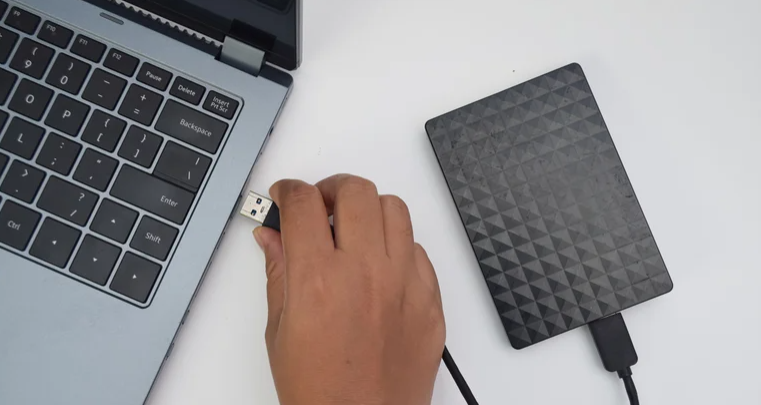
You might not think much of unplugging a drive when transferring files is taking too long, but doing so can result in a loss of data or the entire drive becoming damaged. Similarly, you should stay away from cheap accessories when dealing with an external drive, as a flimsy cable that disconnects often is not only frustrating to deal with, but can also pose a risk to both your data and the drive it's being stored in.
In an HDD, a sudden disconnect while the read/write head is moving can cause it to abruptly stop, in extreme cases colliding with the platter. This can result in bad sectors and corrupted data, but it can also permanently damage your drive and render it unusable. There's no threat of physical damage if you're using an external SSD, but your data's still at risk. If you're transferring data and the cable gets disconnected, the data being moved can become corrupted. If it's your only copy of said data, it's possible that doing so can result in it being erased forever. This typically only affects the data being moved, but if you're overwriting a large file on the SSD, the entire file can become corrupted as well.
BGR



 comment replay









 الرجاء الانتظار ...